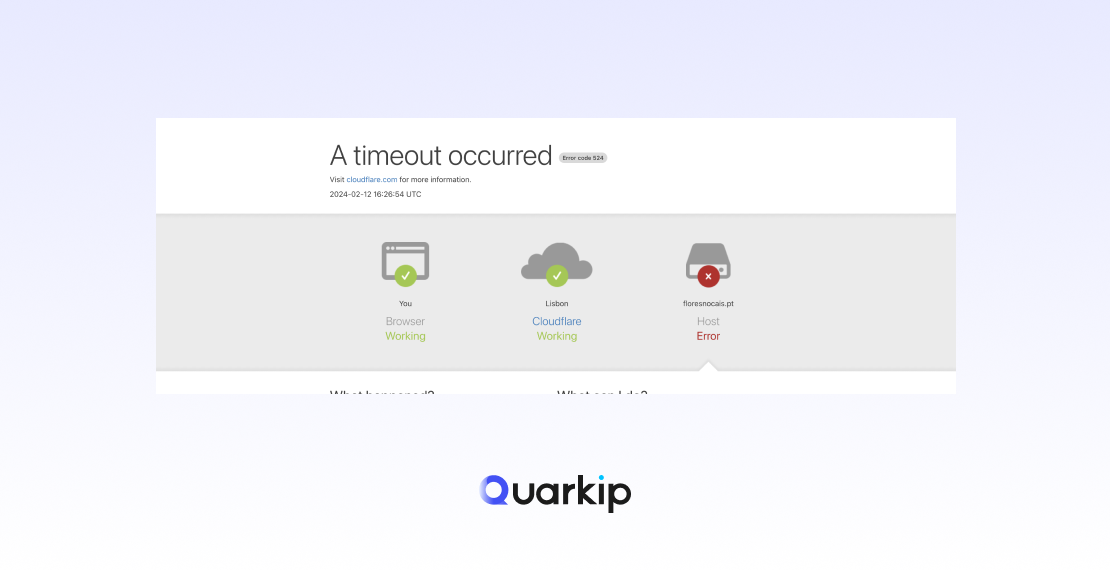
Cloudflare Error 524 occurs when Cloudflare successfully establishes a connection with your server, but the server fails to respond within a reasonable time frame. This error is commonly referred to as a timeout error, and it usually happens when the web server takes too long to respond to a request from Cloudflare. Instead of displaying your website, visitors will encounter a message saying, “504 Gateway Timeout” or “Error 524: A Timeout Occurred”.
In this article, we will explain the common causes of Cloudflare Error 524 and provide effective solutions to resolve it.
What Causes Cloudflare Error 524?
Cloudflare Error 524 typically points to performance issues on your origin server, but several factors can cause the error. Let’s break down some of the most common causes:
1. Server Timeout
The most straightforward cause of Error 524 is that the origin server takes too long to process the request. This might be due to high server load, heavy database queries, or complex scripts that prevent the server from responding quickly enough.
2. Long Database Queries
If your website uses a database, long-running queries can slow down server responses. Complex operations like retrieving large datasets or executing poorly optimized SQL queries might delay server responses beyond Cloudflare’s timeout threshold.
3. Insufficient Server Resources
Sometimes, the server simply doesn’t have enough resources (e.g., CPU, RAM, or disk I/O) to process the request in a timely manner. This can be caused by high traffic volumes or insufficient server configurations to handle the workload.
4. Third-Party API Calls
If your website relies on external APIs or services, the server might be waiting for a response from those services. If the external service experiences delays, the entire page load time can exceed Cloudflare’s timeout, resulting in Error 524.
5. Poor Server Configuration
A misconfigured server, whether from the hosting provider or custom server setup, can contribute to performance issues. For example, a server with high latency, incorrect caching, or mismanaged HTTP requests can delay response times and lead to a timeout error.
How to Fix Cloudflare Error 524: Solutions
1. Check Server Performance and Optimize Resources
The first step in resolving Error 524 is ensuring that your server can handle the requests coming from Cloudflare. Here’s what you can do:
- Upgrade Your Hosting: If your server’s resources (CPU, RAM) are insufficient, consider upgrading to a more powerful hosting plan or moving to a dedicated server or VPS.
- Check for High Server Load: Monitor your server’s resource usage using tools like htop (Linux) or Task Manager (Windows) to identify performance bottlenecks.
- Optimize Server Configurations: If you’re using Apache, Nginx, or another web server, tweak its configuration to ensure optimal performance. For instance, increasing the number of allowed simultaneous connections or adjusting timeouts might help.
2. Optimize Database Queries
Inefficient database queries can severely impact server performance. To resolve this issue:
- Use Indexing: Ensure that your database tables are properly indexed to speed up query execution.
- Optimize Queries: Review and optimize any long-running queries. Use EXPLAIN statements to analyze query performance and refine them for efficiency.
- Implement Caching: Use database caching techniques like Memcached or Redis to store frequently accessed data in memory, reducing the need for time-consuming database queries.
3. Investigate and Fix Third-Party API Issues
If your website relies on external APIs, investigate whether any of them are causing delays:
- Check the External API Status: Sometimes, the issue is external and unrelated to your server. Check whether the third-party service is experiencing downtime or latency issues.
- Optimize API Calls: If possible, optimize the way your server interacts with the API. For instance, reduce the frequency of API requests or implement caching to avoid repeated calls to the same endpoint.
4. Review Cloudflare Settings and Adjust Timeout
Cloudflare has a default timeout setting of 100 seconds for waiting for responses from your server. If your server typically takes longer to respond due to the nature of your website or content, you may want to review your server setup or adjust the timeout settings.
- Increase the Timeout: On Cloudflare’s Enterprise plans, it is possible to adjust the connection timeout to suit your needs. However, it’s generally better to optimize the server and reduce response times instead.
- Check Cloudflare’s Cache Settings: Adjust Cloudflare’s cache settings to cache static content (e.g., images, stylesheets) more effectively, reducing the load on your origin server.
5. Investigate Network Issues
If your server and Cloudflare can’t communicate effectively due to network problems, Error 524 might occur. Ensure there are no network issues or firewall restrictions affecting the connection between Cloudflare and your server:
- Whitelist Cloudflare IPs: Make sure your server’s firewall isn’t blocking Cloudflare’s IPs. Add Cloudflare’s IP addresses to your firewall whitelist if necessary.
- Check Server Connectivity: Ensure your server has a stable connection to the internet, particularly if you’re using a VPN or private network.
6. Check for Server Maintenance or DDoS Attacks
During maintenance or when your server is under a Distributed Denial of Service (DDoS) attack, it might not respond in time, causing Cloudflare to throw Error 524. You can:
- Check Server Logs: Look for any signs of maintenance or unusual traffic spikes in your server logs. Ensure there are no outages or issues affecting your server’s availability.
- Enable DDoS Protection: Ensure that DDoS protection services are enabled to mitigate malicious traffic.
When to Contact Cloudflare Support
If you’ve tried all the solutions above and continue to see Error 524, it might be time to reach out to Cloudflare support. Provide detailed logs and information about your server configuration and the error so that Cloudflare’s support team can help diagnose the issue more effectively.
Conclusion
Cloudflare Error 524 can be frustrating, but it’s usually a sign of performance issues on your server, whether related to server resources, database queries, third-party APIs, or network problems. By following the solutions outlined in this article, you can resolve the timeout error and prevent it from occurring in the future.
Remember, regular server maintenance, database optimization, and resource upgrades are essential for ensuring smooth communication between Cloudflare and your origin server, leading to better performance and fewer interruptions for your users.
PARTNER WITH QUARKIP Publish your content on QuarkIP Sponsored articles, guest posts and contextual link placements for proxy, web scraping, AI and developer audiences. Packages from $80 Start an inquiry →