
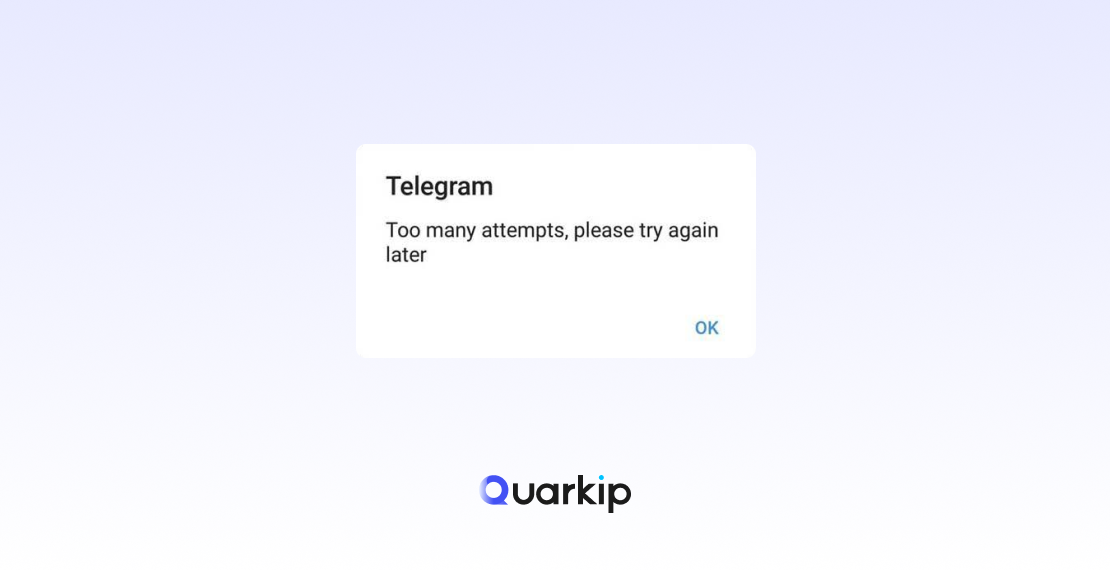
The message means Telegram has temporarily limited a login, verification, or password-related action because too many attempts occurred within a certain period.
Telegram’s own interface includes the exact phrase:
“Too many attempts. Please try again later.”
Behind that message, several different technical limits may exist.
A simplified flow looks like this:
Login or code request
        ↓
Telegram checks recent attempts
        ↓
Too many similar requests detected
        ↓
Rate limit triggered
        ↓
Temporary cooldown
        ↓
User must wait before trying again
The rate limit protects Telegram against:
- repeated code requests;
- password guessing;
- automated login abuse;
- high-volume authentication attempts;
- excessive API calls.
The visible error looks the same to many users, but the underlying cause may be different.
Telegram Too Many Attempts vs FLOOD_WAIT: What’s the Difference?
These terms are related, but not identical.
Too Many Attempts
This is the user-facing message shown in Telegram clients.
It tells you that Telegram has limited the current action.
FLOOD_WAIT_X
Telegram’s API uses FLOOD_WAIT_X when the user or application must wait before making the same type of request again.
Telegram’s official error documentation explains:
FLOOD_WAIT_Xmeans a wait of X seconds is required.
For example:
FLOOD_WAIT_3600means:
Wait 3,600 seconds
= 60 minutes
A value such as:
FLOOD_WAIT_53338would equal about 14.8 hours.
Recent Telegram users have reported seeing this exact style of countdown in 2026, including values around 15–20 hours.
If Telegram provides a numeric flood-wait value, that number is more useful than generic advice such as “wait 24 hours.”
Why Does Telegram Say Too Many Attempts?
There are several common causes.
1. You Requested Too Many Verification Codes
This is one of the most common triggers.
Telegram’s auth.sendCode method explicitly documents:
PHONE_NUMBER_FLOOD
with the meaning:
You asked for the code too many times.
A typical sequence looks like:
No SMS arrives
↓
Request another code
↓
Still nothing
↓
Request again
↓
Request again
↓
PHONE_NUMBER_FLOOD
This is why repeatedly tapping Resend Code is a bad troubleshooting strategy.
If your original issue was a Telegram verification code not received problem, excessive retries can turn a delivery issue into a rate-limit problem.
2. You Tried Logging In Too Many Times
Telegram separately documents:
PHONE_PASSWORD_FLOOD
which means:
You have tried logging in too many times.
This can happen when users repeatedly:
- enter the wrong password;
- retry Two-Step Verification;
- restart the login flow;
- test different codes;
- repeatedly switch between devices.
This is not exactly the same as requesting too many SMS codes.
Telegram treats code requests and password/login attempts as separate kinds of abuse protection.
3. You Entered Too Many Wrong Verification Codes
A code can fail because it is:
- expired;
- mistyped;
- copied from an older login attempt;
- delivered to another Telegram session;
- replaced by a newer code.
Telegram clients also distinguish between:
- invalid codes;
- expired codes;
- too many attempts.
If you request several codes in succession, you may accidentally keep entering an older code that Telegram has already invalidated.
That can create a cycle:
Request code A
↓
Request code B
↓
Code A arrives late
↓
Enter code A
↓
Invalid
↓
Retry
↓
Rate limit
Waiting for one active verification flow is safer than generating many codes.
4. Someone Else May Be Requesting Codes for Your Number
Sometimes users see “Too many attempts” even when they personally did not make many attempts.
This can happen when:
- someone else repeatedly enters your phone number;
- an attacker tries to access the account;
- an automated script keeps requesting login codes;
- a recycled phone number has previous Telegram history.
Recent 2026 community reports include users who saw repeated flood-wait limits despite making few or no manual attempts themselves. Some also suspected account compromise or automated login attempts.
This does not prove that every unexpected rate limit means your account is hacked.
But if the message appears unexpectedly, review your account security once you regain access.
5. Your Phone Number May Have Previous Account History
Phone numbers are sometimes recycled by mobile carriers.
A “new” number to you may have belonged to someone else before.
A recent 2026 Telegram user reported seeing “Too many attempts” immediately despite never having created an account, raising the possibility of previous-number history or earlier failed verification attempts.
Telegram does not publish the exact internal rules for how long historical attempt data affects a number.
Still, reused phone numbers can create confusing login behavior.
6. Automation or Third-Party Tools Are Making Repeated Requests
If you use:
- automation software;
- unofficial Telegram clients;
- scripts;
- custom API tools;
- login testing tools;
they may generate more authentication requests than you realize.
Telegram’s API includes flood-control mechanisms specifically to prevent excessive repeated method calls.
One manual login attempt may correspond to several background API requests if the tool is poorly designed.
For normal account recovery, use an official Telegram client whenever possible.
How Long Does Telegram “Too Many Attempts” Last?
There is no single universal cooldown time for every Telegram rate limit.
This is one of the most important points.
Many articles claim:
“Telegram Too Many Attempts always lasts 24 hours.”
That is too simplistic.
Telegram’s official documentation uses FLOOD_WAIT_X, where X is the required wait time in seconds.
That means the cooldown can vary.
Examples:
| FLOOD_WAIT | Approximate Wait |
|---|---|
| 300 | 5 minutes |
| 1800 | 30 minutes |
| 3600 | 1 hour |
| 21600 | 6 hours |
| 43200 | 12 hours |
| 86400 | 24 hours |
If the Telegram interface or client exposes an exact countdown, follow that timer.
Do not assume another person’s cooldown applies to your account.
Why Does the Telegram Timer Keep Coming Back?
This is one of the most frustrating scenarios.
A user waits 20 hours, tries again, and receives another 20-hour limit.
There are several possible explanations.
You retried before the cooldown fully ended
Even a small early retry can trigger another limit.
The rate limit applies to a different action
You may have waited for a code-request limit but then triggered a password-attempt limit.
Someone else is still making requests
If another device, script, or attacker keeps generating login attempts, the account or number may continue receiving new rate limits.
Telegram dynamically extends the limit
Rate limits often become stricter when repeated abuse patterns continue.
Telegram does not publish the exact escalation formula for every login scenario.
Recent users have reported repeated 20-hour timers and multi-day periods where the message returned after each retry.
How to Fix Telegram Too Many Attempts
The best fix is usually not another trick.
It is to stop feeding the rate limit.
Step 1: Stop All Login and Code Requests
Once Telegram shows Too Many Attempts, stop.
Do not:
- request another SMS;
- repeatedly restart the app;
- enter passwords again;
- try the same login every few minutes.
Every extra request gives Telegram another event to evaluate.
If the restriction is based on repeated attempts, more attempts are the opposite of what you need.
Step 2: Check for a FLOOD_WAIT Timer
Some Telegram clients or API responses expose a specific wait value.
If you see:
FLOOD_WAIT_7200wait the full 7,200 seconds, or two hours.
If Telegram only says:
“Please try again later”
without a number, you do not have an official exact duration.
In that case, stop retrying and allow a meaningful cooldown before your next attempt.
Step 3: Do Not Keep Testing the Timer
A common mistake is:
Wait 2 hours
↓
Try
↓
Still blocked
↓
Wait 1 hour
↓
Try again
↓
Still blocked
This makes troubleshooting harder.
If the server still considers you rate-limited, every test adds more login activity.
Once you decide to wait, actually wait.
Step 4: Check Existing Telegram Sessions
If you still have Telegram open on:
- an old phone;
- a tablet;
- Telegram Desktop;
- another device;
do not log out.
An active session may help you:
- review connected devices;
- change your Two-Step Verification settings;
- add a passkey;
- terminate unknown sessions;
- confirm whether someone else accessed the account.
If your problem started after unexpectedly being logged out everywhere, treat that as a possible security issue rather than only a rate-limit problem.
Step 5: Secure Your Account If You Suspect Unauthorized Attempts
Once you regain access:
- Review Settings → Devices.
- Terminate sessions you do not recognize.
- Enable Two-Step Verification.
- Add or update recovery information.
- Create a passkey if available.
Recent Telegram users experiencing repeated flood waits have also reported suspected malware or unauthorized login attempts.
If the restriction appeared after unexpected logouts, scan your devices for malware before signing back in.
Step 6: Use the Latest Official Telegram App
Telegram’s authentication API includes:
UPDATE_APP_TO_LOGIN
which means users may need to update the client before authentication can continue.
Use the official Telegram app or another official Telegram client.
Avoid relying on random modified APKs or unknown third-party applications.
Step 7: Contact Telegram Support if the Limit Persists
If:
- you waited far longer than the displayed timer;
- the limit immediately returns;
- you never made repeated attempts;
- you suspect someone else is generating requests;
- you cannot access any existing session;
contact Telegram support.
Explain:
- your phone number;
- country and carrier;
- when the restriction started;
- whether Telegram shows a timer;
- whether you were unexpectedly logged out;
- whether another device still has access.
Do not send your verification code or Two-Step Verification password.
Should You Wait 24 Hours After Telegram Too Many Attempts?
Sometimes 24 hours may be enough.
But 24 hours is not an official universal rule.
Telegram’s flood-control system can specify different wait durations through FLOOD_WAIT_X.
Recent users have reported:
- limits around 15 hours;
- repeated 20-hour timers;
- problems lasting multiple days.
Therefore:
Follow an exact Telegram timer if one exists.
If no timer appears, avoid repeatedly checking every few hours.
Does Reinstalling Telegram Fix Too Many Attempts?
Usually not.
Rate limits are generally enforced server-side.
Reinstalling the app does not erase:
- recent code requests;
- recent login attempts;
- rate-limit state;
- password attempts.
It can also create a new problem if you uninstall Telegram from your only active session.
Update the app if necessary, but do not expect reinstalling it to reset a Telegram flood limit.
Does Changing Your IP Fix Telegram Too Many Attempts?
There is no reliable evidence that simply changing your IP resets Telegram’s authentication rate limit.
Community advice is inconsistent.
Some users report success after changing networks, while others report trying different VPNs, proxies, devices, and clients without removing the restriction.
The Telegram API’s documented flood errors focus on excessive method attempts and phone-number/login activity, not on an official “bad IP” reset mechanism.
So:
Do not treat IP switching as a guaranteed fix.
If Telegram explicitly tells you to wait, the most reliable action is still to wait.
If you want to understand how IP reputation, blacklist history, and previous network usage are evaluated more generally, see our guide to what is a clean IP.
Can a VPN or Proxy Bypass Telegram Too Many Attempts?
You should not rely on one.
A VPN or proxy can change the network route and public IP address, but it cannot automatically erase server-side rate-limit state associated with:
- your phone number;
- login flow;
- code requests;
- password attempts.
If your local network cannot reach Telegram at all, a different network may solve a connectivity problem.
That is separate from a Telegram authentication flood limit.
What If Telegram Says Too Many Attempts on the First Try?
This is unusual but possible.
Potential explanations include:
- your phone number was recently recycled;
- someone else has been requesting Telegram codes for your number;
- an attacker is attempting to access your account;
- previous requests are still counted in the cooldown window.
A 2026 user reported receiving the error while trying to register for the first time and continued seeing it after several days.
If this happens:
- Stop repeated attempts.
- Wait for the cooldown.
- Confirm you fully control the phone number.
- Ask your carrier whether the number was recently reassigned.
- Contact Telegram support if the problem persists.
Too Many Attempts After Entering a Telegram Password
This may be a password-related flood rather than an SMS problem.
Telegram documents:
PHONE_PASSWORD_FLOOD
for repeated login attempts.
If Telegram asks for a Two-Step Verification password:
Do not repeatedly guess passwords.
Instead, use Telegram’s supported password-recovery options where available.
Repeated guessing can trigger another cooldown and make account recovery slower.
Too Many Attempts After Requesting Verification Codes
This is more likely related to:
PHONE_NUMBER_FLOOD
Telegram defines this as requesting the code too many times.
If your actual problem is that Telegram verification codes are not arriving, stop requesting more codes and troubleshoot the delivery path first.
The code may have:
- gone to another Telegram session;
- been delayed by the carrier;
- entered an SMS Fee flow;
- failed because of a number-related issue.
Generating more codes can make the situation worse.
Telegram Too Many Attempts Troubleshooting Checklist
| What Happened Before the Error? | Likely Issue | Best Next Step |
|---|---|---|
| Requested many SMS codes | PHONE_NUMBER_FLOOD | Stop requests and wait |
| Entered password repeatedly | PHONE_PASSWORD_FLOOD | Stop guessing and wait |
Exact FLOOD_WAIT_X appears | Server cooldown | Wait X seconds |
| Error appears on first attempt | Previous number/account activity | Wait and investigate number history |
| Unexpected logout + repeated limits | Possible security issue | Secure devices and account |
| Verification code never arrived | Delivery problem became rate limit | Fix code-delivery issue after cooldown |
| SMS Fee screen appears | Different verification flow | Follow SMS Fee guidance |
What Not to Do When Telegram Rate-Limits You
Avoid Repeated Testing
Checking whether the restriction has disappeared every few minutes can create more authentication attempts.
Don’t Guess Your Two-Step Password Repeatedly
Use password recovery if available rather than brute-forcing your own account.
Keep Any Existing Session Active
An authenticated Telegram session can help with account recovery and security review.
Avoid Random Modified Telegram Apps
Use official clients when recovering access.
Don’t Share Login Codes
No legitimate helper needs your Telegram verification code.
Don’t Assume a New IP Automatically Resets the Limit
Telegram’s documented errors are tied to excessive requests and login activity, so a network change is not a guaranteed reset.
How to Prevent Telegram “Too Many Attempts” in the Future
Request One Verification Code at a Time
Wait for the current code and timer before requesting another.
Keep One Trusted Telegram Session Active
An existing session can receive login codes and make recovery easier.
Enable Two-Step Verification
An additional password protects the account even if someone obtains an SMS code.
Create a Passkey
If Telegram supports passkeys on your device, configure one while you still have account access.
Review Active Sessions
Terminate devices you no longer recognize.
Secure Your Phone and Computer
Unexpected logouts combined with repeated login attempts can sometimes indicate account compromise.
Frequently Asked Questions
How long does Telegram Too Many Attempts last?
There is no universal fixed duration.
Telegram’s API can return FLOOD_WAIT_X, where X represents the required wait time in seconds.
If Telegram shows a timer, follow it exactly.
Is Telegram Too Many Attempts always 24 hours?
No.
Some limits may be shorter, while others can approach or exceed 24 hours.
The exact duration depends on the specific rate limit and recent activity.
Why does Telegram keep resetting the wait time?
Possible causes include repeated retries, different flood limits, or ongoing login/code requests from another source.
Telegram does not publish the full escalation algorithm.
What is PHONE_NUMBER_FLOOD?
Telegram defines PHONE_NUMBER_FLOOD as requesting the verification code too many times.
Stop requesting new codes and wait for the restriction to expire.
What is PHONE_PASSWORD_FLOOD?
Telegram uses PHONE_PASSWORD_FLOOD when a user has tried logging in too many times.
This is different from repeatedly requesting SMS codes.
What does FLOOD_WAIT_X mean?
It means Telegram requires you to wait X seconds before making the same request again.
For example, FLOOD_WAIT_3600 means a one-hour wait.
Can restarting my phone remove Telegram Too Many Attempts?
Usually not.
Telegram enforces rate limits on its servers, so restarting the phone does not erase recent authentication attempts.
Can reinstalling Telegram reset the limit?
Usually no.
Reinstallation does not normally clear server-side flood-control state.
Will changing my IP fix Telegram Too Many Attempts?
There is no reliable evidence that an IP change consistently resets Telegram login rate limits.
The documented errors relate to excessive login and code-request activity.
Why am I seeing Too Many Attempts even though I only tried once?
Your number may have recent authentication history from another device, another person, or a previous number owner.
If the issue persists after a proper cooldown, contact Telegram support.
What if someone else keeps requesting codes for my Telegram number?
Stop adding your own attempts.
Once you regain access, review active sessions, enable Two-Step Verification, and secure your devices.
If the limit keeps returning despite no activity from you, contact Telegram support.
Final Thoughts
Telegram’s “Too many attempts, please try again later” message is frustrating because it looks like one simple error while actually covering several different rate-limit situations.
Telegram officially distinguishes between:
PHONE_NUMBER_FLOOD
→ Too many code requests

PHONE_PASSWORD_FLOOD
→ Too many login/password attempts

FLOOD_WAIT_X
→ Wait X seconds before retrying
The best fix is usually not to reinstall Telegram, switch through random IP addresses, or repeatedly test whether the restriction disappeared.
Instead:
Stop making requests, identify which action triggered the limit, follow any exact cooldown Telegram provides, and only try again after the wait period fully ends.
If the restriction appeared unexpectedly—especially after being logged out of your devices—treat account security as part of the investigation.
And if the original problem was a missing verification code, solve that underlying issue after the cooldown rather than creating another cycle of repeated code requests.
The fastest way out of a Telegram rate limit is often the simplest:
stop retrying long enough for the limit to actually expire.
PARTNER WITH QUARKIP Publish your content on QuarkIP Sponsored articles, guest posts and contextual link placements for proxy, web scraping, AI and developer audiences. Packages from $80 Start an inquiry →